What Is a Product Structure Exploded View: Definition, Purpose, and Criteria for a Good Drawing
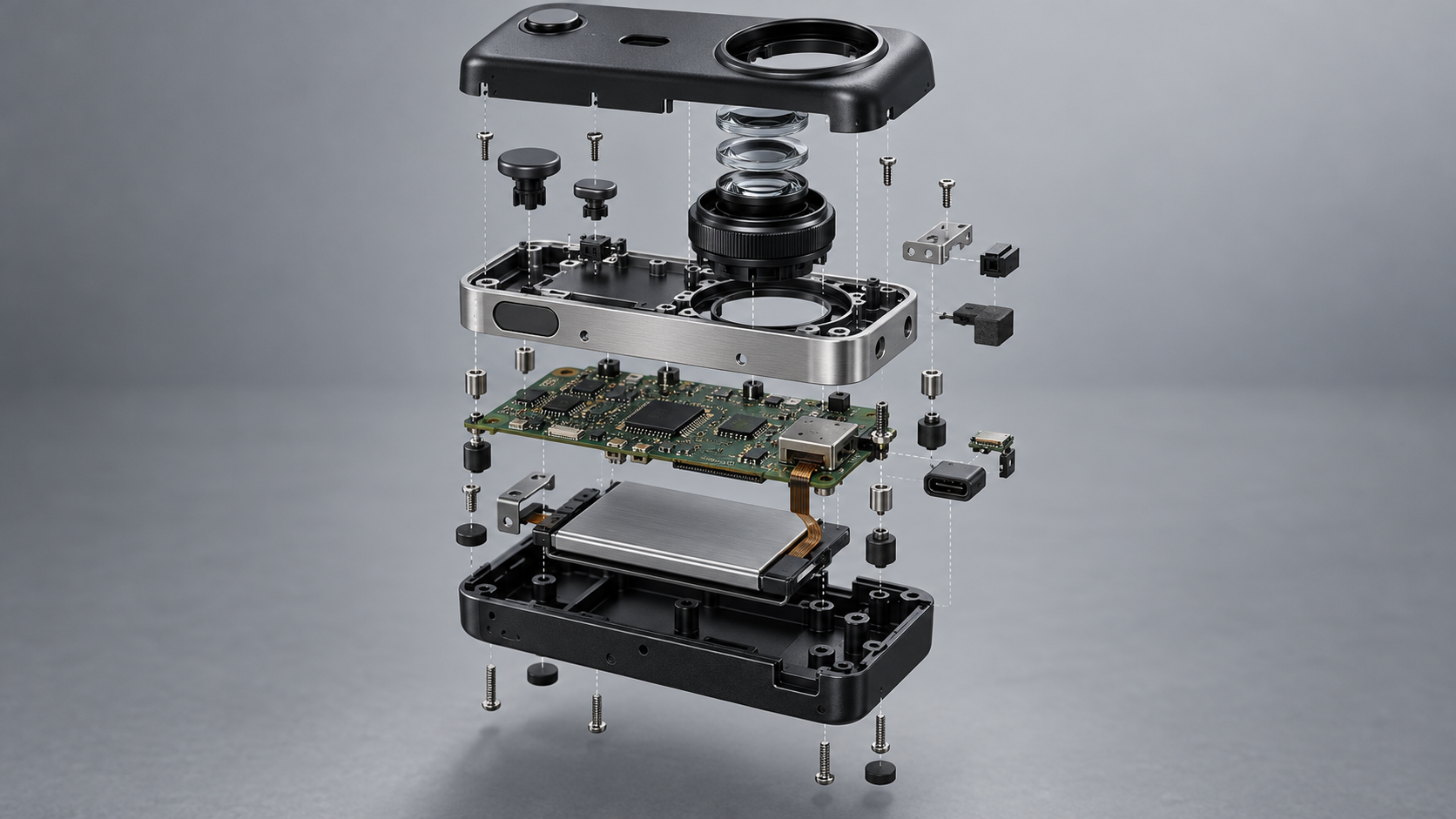
For structural designers, a product structure exploded view is not a schematic added after finishing a rendering; it is a fundamental skill that must be known and mastered. Its definition is simple: pull the complete assembly apart along the disassembly axis so that each part's position, material, name, and joining method are visible. So-called exploded views are essentially a three-dimensional assembly drawing.
It solves three problems. First, verifying structure: how parts are arranged in space, in what order they are assembled, and whether they will clash—one drawing exposes this more clearly than ten pages of text. Second, communication: during project presentations, decision-makers without a technical background cannot understand sections and tolerance tables, but they can understand "who fits over whom, who locks whom." Third, demonstrating professionalism: whether a portfolio includes exploded views directly reflects whether the designer has truly delved into structure rather than just doing appearance.
Judgment Criteria: Good-Looking Does Not Equal Useful
Whether a product structure exploded view is qualified depends on four points: whether the assembly sequence can be read from the drawing; whether adjacent parts interfere; whether wall thickness and draft direction are clearly explained; and whether annotations match the BOM. No matter how beautifully rendered, if the disassembly directions contradict each other and parts float without aligning, it is merely a decorative picture.
A common industry habit for judgment is: first check whether the explosion axis is unified, then check whether part spacing is consistent with assembly order, and only then look at materials and lighting. Axis consistency matters far more than color—multiple axes flying around is the most common beginner mistake.
Seven Types of Product Structure Exploded Views: Selection Logic from Renders to Physical Objects
There is no single correct way to draw an exploded view, only a way that matches the purpose. For the same structure, a rendered exploded view can be drawn for client presentations, a section view for checking internal snap-fit fits, and a physical exploded view should be posted beside the assembly station. Below, seven common types are broken down, each clearly explaining definition, method, advantages and disadvantages, and when to use it, making it easy to choose by scenario.
NO.1 Rendered Exploded View: The First Choice for Client Presentations and Portfolios
Assign materials to parts, set up lighting, add environmental reflections, and pull the disassembly direction along a single or multiple axes. Visual quality is high, and people without a technical background can understand "what blocks the product consists of." The disadvantages are a long production cycle, and incorrect materials can obscure the true color and texture. Use it first for presentations and portfolio cover pages, but do not pull part spacing too wide just for looks, or the assembly sequence will become confusing.
NO.2 Flat Lay Exploded View: The Only Solution When There Are Many Parts
Place all parts on the same plane, grouped by size or function, and shoot from above or use orthographic projection. When there are more than a few dozen parts, a flat lay is clearer than a three-dimensional explosion—there is no front-to-back occlusion, and every part's outline and quantity can be seen clearly. The cost is losing assembly direction information, which needs to be restored with additional arrows or numbers. It is most practical for checking BOMs, counting parts, and showing lists to suppliers.
NO.3 Section View: The Magic Mirror for Checking Internal Fits
Cut open the shell or main body along a section plane to reveal the true fit relationships of internal shafts, snaps, and screw bosses. Checking whether wall thickness is uniform, whether draft direction is consistent with the disassembly direction, and whether moving parts interfere is far more reliable with sections than with perspective. The disadvantage is that it shows only one cut plane, so complex structures require multiple drawings. It is essential during structural review; check the section view before making a rendered exploded view.
NO.4 Hand-Drawn Exploded View: Practice and Quick Communication
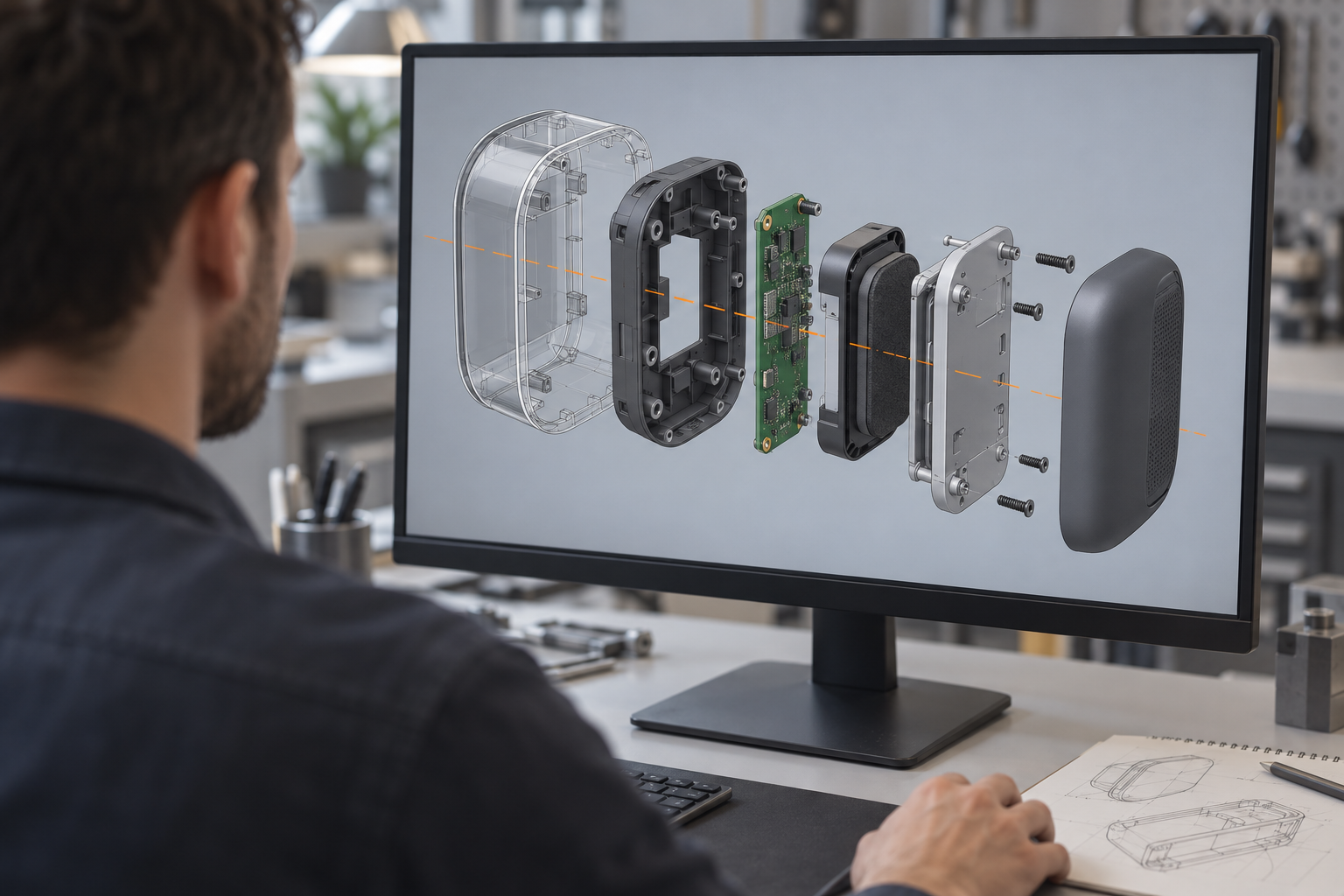
Use lines and a small amount of light and shade to draw the disassembly relationships, without pursuing realistic materials. Drawing a hand-drawn exploded view is equivalent to assembling the structure once in your mind—many problems that "look right but cannot be assembled" are exposed by the time you draw the third layer of parts. Drawing on the spot for engineers in a meeting is much faster than sending a rendering afterward. The disadvantage is low precision, so it cannot be used directly as an engineering drawing.
NO.5 Structural Detail View: A Magnifying Glass for Local Difficulties
Do not draw the whole product; draw only key local areas such as snaps, hinges, and seals, enlarged with fit dimensions and movement directions marked. In a full-product exploded view, a snap may be only a few millimeters, and no one can see it clearly; a detail view isolates this one spot and explains it with one or two dimensions. It is suitable as a supplementary page beside an exploded view, not as a standalone main image.
NO.6 Physical Exploded View: Reducing Production Error Rates
Disassemble a physical prototype, arrange the parts in assembly order, and photograph or film them. European and American design schools often encourage this practice—because renderings can lie, but the order in which physical parts are laid out cannot. Showing a physical exploded view to production line workers usually results in lower assembly error rates than showing pure engineering drawings. After completing a prototype or first batch of samples, spend half an hour shooting a set; its archival value is high.
NO.7 Cool Exploded View: The Trade-Off Between Visual Impact and Information Content
Large-angle diagonal disassembly, parts staggered at different heights, and strong contrasting colors create a striking first impression. But once there are many parts, front-to-back occlusion becomes severe, and the structural information actually visible is limited. It can be used for promotional posters and launch event PPTs; use it cautiously for structural reviews and portfolio interior pages. The criterion is simple: whether the audience can count the main parts and state the assembly sequence within three seconds; if not, it is overdone.
The selection logic can be summarized in one sentence: use rendered or cool types to persuade non-technical audiences, use section or detail types to check structure, use flat lay or physical types for manufacturing coordination, and use hand-drawn types for practice and quick communication. A project often requires two or three types, each serving its own role.
Structural Checks Before Making an Exploded View: Assembly Sequence, Interference, and Process Constraints
Whether a product structure exploded view is good depends half on whether you thought it through before drawing. Do the structural check first, then open software to model or draw by hand. The checklist is not complicated, but if any item is missed, no matter how good the drawing looks, it will not withstand scrutiny.
Disassembly Axis: Define the Direction First, Then Move the Parts
Decide whether this exploded view should unfold along a single axis or multiple axes. A single axis suits products with simple structures, such as a sensor housing made of a top and bottom shell, a PCBA, and four screws—just pull it apart along one vertical axis. Multiple axes suit products with intersecting assembly relationships, such as a desk lamp with a rotating joint, where the lamp head, linkage, and base each have their own disassembly direction.
The axis direction should ideally match the actual assembly direction. If the product is assembled from the bottom up, the exploded view should also unfold along that direction, so the assembly sequence naturally emerges as the viewer reads the diagram. If you twist the disassembly direction opposite to the assembly, readers can easily get the order of parts reversed.
Assembly sequence: who goes in first, who goes in later, determines the reading order of the diagram
An exploded view is essentially an assembly instruction sheet. Before drawing, arrange the parts once according to the actual assembly order: install the internal functional components first, then the mid-frame or bracket, and finally close the housing and tighten the screws. Structures like screw bosses, snaps, and locating pins are the most likely to expose sequence problems—if the locating pins are installed before the PCBA, the PCBA won't fit in; if the snaps face inward, they can't spring back when the housing is closed.
Once the sequence is clear, the part numbers, disassembly spacing, and leader line angles in the exploded view have a basis. Making the numbering sequence consistent with the assembly sequence is the least troublesome way to reduce ambiguity.
Interference check: what's visible and invisible in an exploded view
An exploded view explodes the visuals, but the interference between parts is real. Before drawing, confirm at least three things: whether adjacent parts have swept interference along the assembly path, whether there is operating space for a screwdriver or tooling, and whether the snaps have enough elastic deformation during the snap-fit process. Common failure points are decorative parts competing for space with functional parts, or the battery compartment and motherboard stacking up so the total height exceeds the housing's internal cavity.
An exploded view cannot replace the results of motion simulation or interference-check software, but it can "visualize" interference risks for non-technical decision-makers. After discovering interference, marking it on the diagram with a cloud line or a partial close-up is far more effective than a verbal description.
Process constraints: the correspondence between wall thickness, draft, and disassembly direction
The last step of the structural check is to confirm whether each part can be made with existing processes. For injection-molded parts, check whether the wall thickness is uniform—abrupt changes in wall thickness tend to cause sink marks, and you can conveniently note the recommended wall thickness range next to the part name in the exploded view. Common thermoplastic parts in the industry mostly have wall thicknesses between 1.0–3.5 mm, depending on the material and part size; when confirming, refer to the drawings and the supplier's DFM feedback. The draft direction should match the disassembly direction or the mold-opening direction, otherwise the part will be scratched when ejected.
For CNC parts, check the fixturing datum and tool accessibility. For an aluminum part with a deep internal cavity, marking the machining face orientation in the exploded view can help the process engineer determine whether a flip-fixturing is needed. For sheet metal parts, check the bending direction and unfolding interference; marking the bend lines in the exploded view prevents reversed assembly. For 3D-printed parts, check the support removal path and layer line direction, keeping the load-bearing direction away from the direction of weak interlayer bonding. Different processes have different concerns, and the annotation focus in the exploded view should adjust accordingly.
Once these checks are done, the exploded view is no longer just "pulling the parts apart and arranging them nicely," but a product structure exploded view that can support assembly reviews, DFM communication, and portfolio storytelling. Spend an extra twenty minutes before drawing, and you'll save two days of revisions after.
Three ways to label an exploded view: how to choose between numbers, names, and annotations
The parts are taken apart and the lines are drawn, yet the viewer can't tell which is which—the problem is probably not the diagram, but the labeling. There is no single correct answer for labeling a product structure exploded view, but there is a stable, usable set of selection logic: the number of parts determines whether to use numbering, whether the parts are common determines whether to add names, and whether the structure is intuitive determines whether to add annotations. Each of the three methods has its applicable boundaries, and mixing them is actually the most common cause of failure. Below, we lay it out in order from many parts to few, and from complex structures to simple ones.
Numbers + names: scenarios with many parts and deep assembly hierarchies
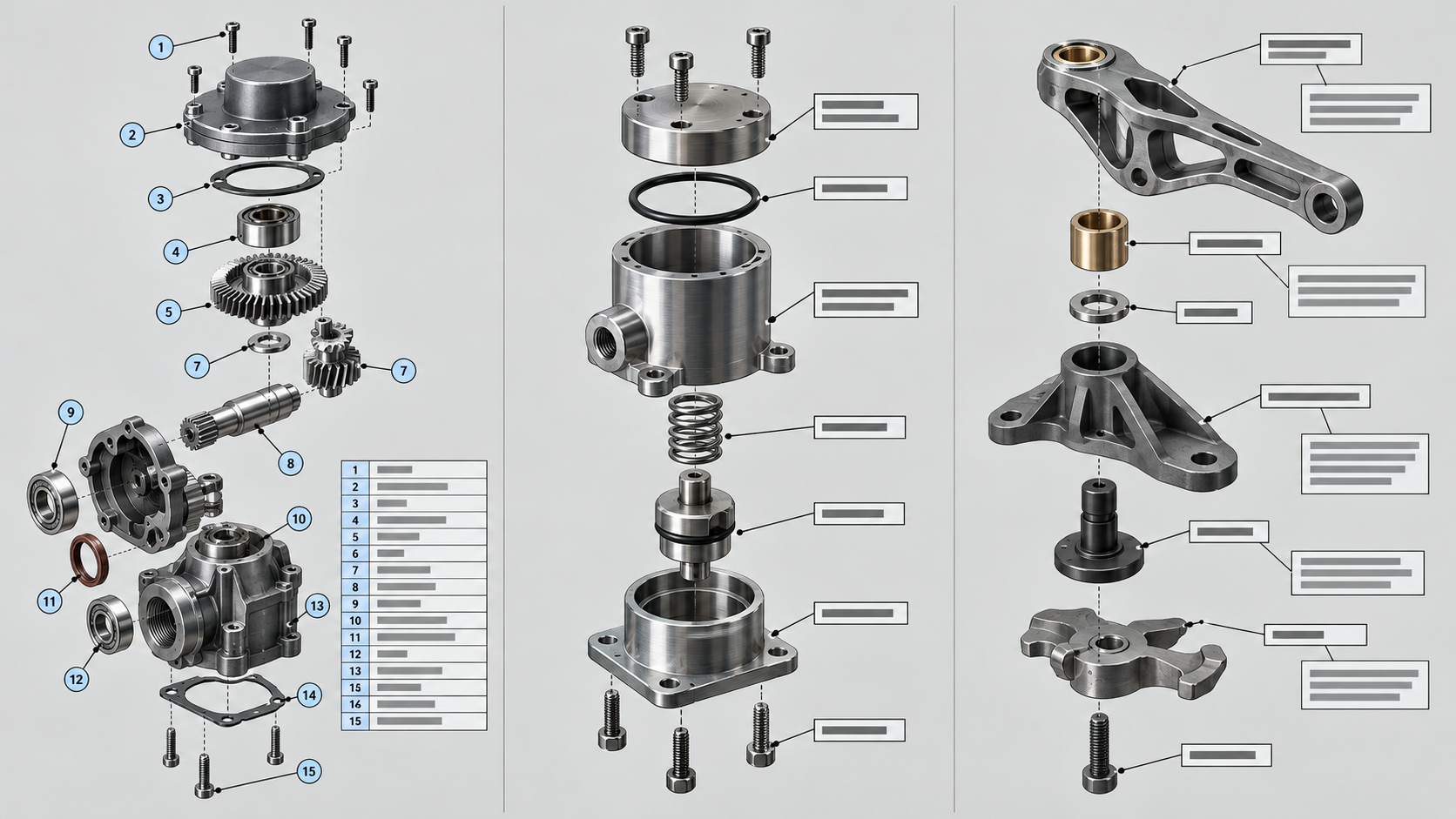
When there are more than a dozen parts and they're divided into upper and lower housings and internal modules, writing names directly on the diagram will crowd the image and make the leader lines clash with each other. In this case, use circled numbers or boxed numbers with a legend table: the number corresponds to the part name, with material and quantity added if necessary. The drawing stays clean, and the viewer can follow the numbers to find what they need.
The key detail is the numbering sequence. The numbering must be consistent with the assembly sequence, starting from the main body or datum part, and numbering from inside to outside and from bottom to top. This way, as the viewer reads along the numbers, the disassembly logic and the assembly logic are the same set, and they won't get lost midway. For the numbers themselves, it's recommended to use a uniform font size, uniform circle style, and uniform leader line angle—leader lines should point from the part outline to the outer blank area as much as possible, avoiding crossing other parts.
Directly labeling names: fastest when there are few and common structures
When there are only five or six parts, and they're all structures recognizable at a glance like screws, snaps, and washers, adding numbers is redundant. Just write the names next to the parts with short leader lines, and the viewer's eyes don't have to jump back and forth. The cost of this method is that the white space is occupied, and it gets messy once there are many parts, so it's naturally only suitable for simple structures.
There's an easily overlooked point in layout: place the name text uniformly on one side of the end of the leader line, not sometimes left and sometimes right. Font size should also have hierarchy—use the main font size for part names, and a size smaller for material and quantity, so that visually you read the name first and then the attributes, matching the reading order.
Names + annotations: adding a layer of explanation when the structure is simple but uncommon
Some parts are few in number, but their shape or function is uncommon, and the viewer still won't understand what they do just from the name. For example, a specially shaped snap-fit part or a non-standard cushioning structure—follow the name with a short annotation: the snap-fit method, the force direction, the assembly orientation. Keep the annotation within ten characters; if it's longer, it becomes a mini-essay that nobody reads.
Another use of annotations is to mark process information—where the draft direction is, where tolerance control is needed. This kind of annotation is more valuable in project submissions than in pure display drawings, because it directly answers the question of "can this structure be made." As for which process information is worth marking in an exploded view, that will be covered separately later.
Labeling must match the BOM
The last point is a hard requirement, and also the most commonly skipped step: the numbers, names, and quantities in the exploded view must correspond one-to-one with the BOM. If the diagram shows 12 parts but the BOM has only 11 items, or the numbering sequence doesn't match the BOM sequence, then during assembly people have to match them up by brain—and the error rate immediately goes up. After finishing the labeling, spend five minutes checking the legend table against the BOM line by line; what you save is the rework time later.
If the exploded view is to be handed to an external processor for material preparation, labeling standards become even more important: part names should preferably include process attributes (such as "aluminum alloy 6061 bracket" or "ABS upper shell"), and quantities should be written in parentheses after the name. Only when the drawing, table, and BOM are consistent is the drawing truly usable.
Hand-drawing product structure exploded views: a practice method from large forms to details
Hand-drawing a product structure exploded view is not a substitute for software rendering, but an independent structural understanding training. In software, parts can be dragged around at will, but when hand-drawing, every disassembly axis and every occlusion relationship must first be thought through in your head—if you can't think it through, you can't draw it. This "forced to think it through" is precisely the core value of hand-drawing product structure exploded views: it exposes the gap between "looks right" and "can be assembled" on paper.
Draw the large forms and disassembly axes first, then add parts layer by layer
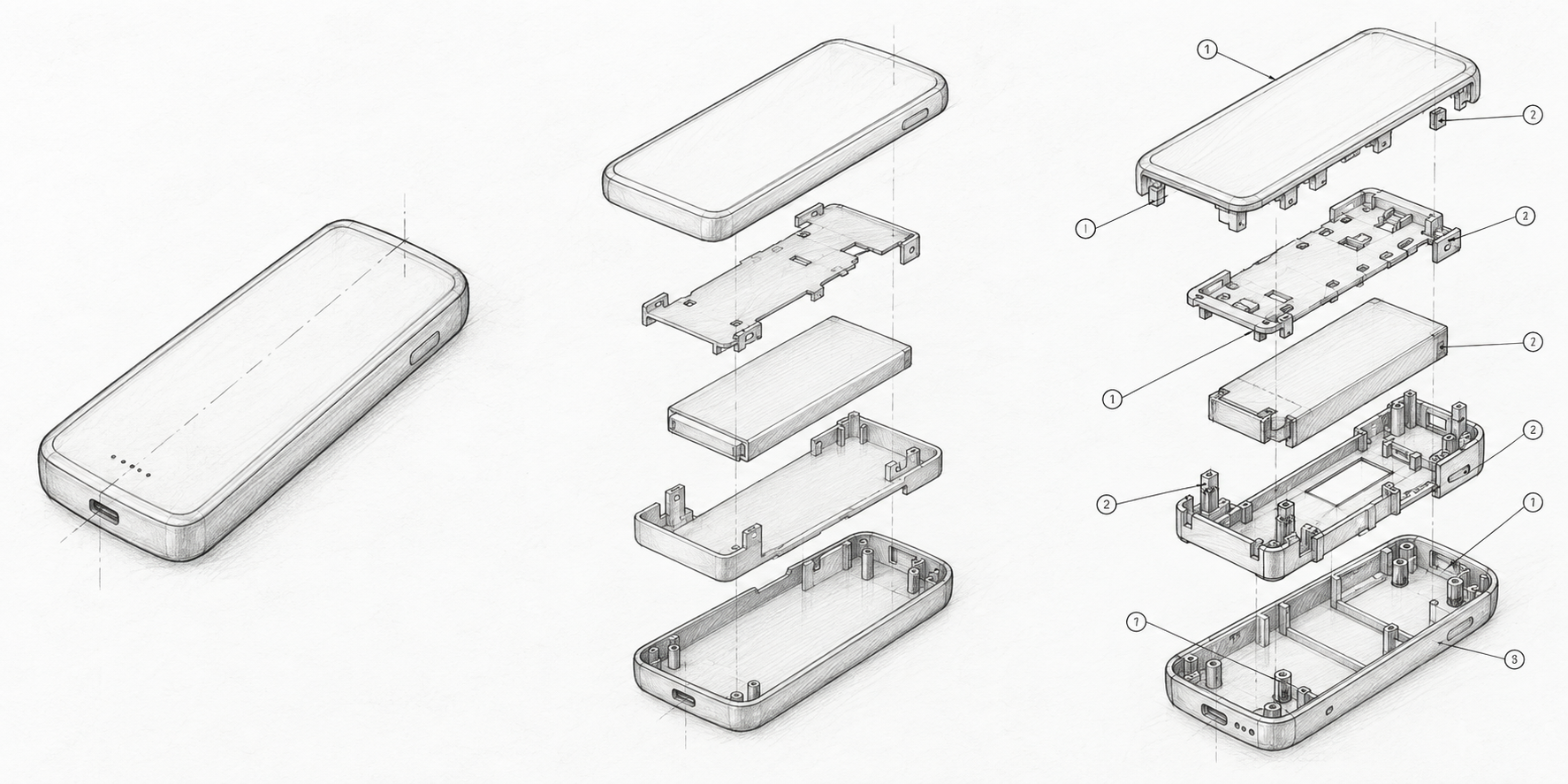
It's recommended to divide the drafting sequence into three steps; don't start by fussing over details. Step one: use light lines to sketch the product's main outline and disassembly axes: for single-axis assembly, draw one axis running through; for multi-axis disassembly, first define the starting point and direction of each axis. Once the axes are set, the arrangement positions of the parts are set, and the image won't fall apart.
Step two: start from the largest shell or main structure, and draw the adjacent parts in sequence along the axis, drawing only the outer block shapes first to confirm whether the spacing between them is even and whether the occlusion relationships are reasonable. When arranging, pay attention to visual harmony: since parts differ in size, the spacing should adjust accordingly—leave larger spacing for large parts and tighten it for small parts, so it looks neither empty nor crowded.
Step three is adding details—the hook shape of snaps, the wall thickness of screw bosses, the height of locating pins, the direction of ribs. These structures are exactly where hand-drawing most easily exposes problems. When you draw a snap, you'll instinctively ask: is the snap-fit direction correct? Can it really be pulled out along the disassembly axis? If you can't draw it, it's most likely that the structure itself has a problem, not your technique.
Using a Sony camera as a case study: the drawing process from simple forms to details
Practicing with a Sony camera is a good choice: the shape is a regular rectangular body, the internal structure is clearly layered, and the number of parts is moderate—neither too simple nor discouraging. When drafting, first draw the large block of the camera body housing, arrange the front shell, mid-frame, and rear shell in sequence along the horizontal axis, leaving spacing proportional to the body thickness. At this step, only aim for correct proportions and arrangement, not for beauty.
Next, add the visible internal parts between the shells: the lens mount ring, sensor assembly, motherboard bracket, and battery compartment divider. Draw each part first as a simplified block shape, and confirm that their order along the axis matches the real assembly order. By this point in hand-drawing, you'll often find that the disassembly direction of some part is blocked by the shell in front of it—in actual assembly, this is interference, and you need to go back and adjust the structure.
Finally, add details and labels: simplify the lens mount threads into a few arcs, draw the center hole and wall thickness of the screw bosses, and sketch the shape of the elastic arm of the snaps. Use numbers for labeling first, and number them all uniformly after all parts are drawn, to avoid changing numbers halfway through. The whole process only needs a pencil for light drafting, a fineliner for inking, and an eraser to remove construction lines—no complex tools required.
Why hand-drawing practice can catch assembly problems early
In software modeling, parts can exist independently and be brought together by assembly constraints, making it visually hard to notice that "this part simply won't fit." Hand-drawing an exploded view of a product structure requires you to draw both the parts and their spatial relationships at the same time. Once something doesn't fit, occlusion conflicts or axis clashes immediately appear in the drawing. This kind of contradiction is more glaring on paper than on screen, and easier to fix.
As for practice frequency, a common approach in the industry is to set aside time each week to copy or draw from memory one product, starting from simple forms and gradually moving to structures with snaps, screw bosses, and sealing rings. Mastering basic composition may take several weeks of continuous practice, and achieving solid structural understanding with accurate strokes often requires months of accumulation. Specific progress varies from person to person, but the order of "draw the overall form first, then refine the details" is basically universal.
The structural intuition developed through hand drawing will ultimately feed back into software modeling and the formal production of product structure exploded views—you'll spot interference earlier, know more clearly which direction the disassembly axis should be set, and have fewer reworks during the rendering stage.
Applications of exploded views in portfolios and project presentations
An exploded view in a portfolio is not a supplement to a render; its task is different: a render proves you can do styling, while a product structure exploded view proves you understand how the product is assembled and why it fits together. When reviewers and interviewers flip through a portfolio, they often spend more time on an exploded view than on a render—because a render is about aesthetics, while an exploded view is about structural judgment. It lets viewers understand the hierarchy of parts, assembly relationships, and design logic without a 3D model or a physical object. What most industrial design portfolios lack is not rendering quality, but this kind of "questionable" structural information.
What role does an exploded view play in a portfolio
A clearly structured exploded view can answer three questions at once: what main parts the product consists of, in what order they are assembled, and what structure realizes the key fits. Rather than describing "modular design" in words, directly marking module boundaries with an exploded view lets readers understand at a glance. Portfolio space is limited, so you should choose the exploded view with the highest information density—usually the one that demonstrates you solved a specific structural challenge, such as the engagement direction of a snap, the load path of a screw boss, or the locating method between two housings. Spreading out all parts indiscriminately actually dilutes the focus.
Layout ratio and placement suggestions
- Ratio: Within a project page, an exploded view usually occupies one to two pages, roughly 1:1 or 1:2 with the render. Projects with complex structures can be given ample space, but you don't need to include one on every page.
- Placement: It flows best after the render and before detail images—first give the overall impression, then explain how the structure is realized, and finally land on the details. Don't put it on the first page; readers can't understand the disassembly relationships before they have a concept of the product.
- Supporting text: Pair the exploded view with 2–3 sentences that point out "why it's designed this way," rather than restating part names already on the drawing. For example, noting "the snap release direction here matches the draft direction, avoiding side-action cores" is far more valuable than writing "snap connection."
- Consistent viewpoint: For the same project, try to keep the exploded views on the same disassembly axis and viewpoint so readers don't have to rebuild their spatial understanding when turning pages.
Project presentations are slightly different. When facing non-technical decision-makers, the role of a product structure exploded view is to lower the barrier to understanding—they may not understand a section view, but they can understand an image of parts pulled apart and arranged in order. In this case, use fewer engineering terms and more intuitive expressions like "how this piece goes on"; annotations can be simplified, even keeping only the main module names. Conversely, for engineering reviews, annotations must be complete and the assembly sequence must withstand questioning. The choice of detail level for the same drawing when facing different readers is itself a reflection of a designer's judgment.

A common mistake is treating an exploded view as a "family photo of all parts": drawing in every screw, washer, and wire, making the image crowded with no sense of hierarchy. Exploded views for portfolios and presentations should subtract—keep only the parts that explain the structural logic, and standard parts can be merged into one group. If a complete list is truly needed, that's the job of a BOM, not an exploded view. At the same time, the exploded view must match the final model: if the part count or disassembly order doesn't match, being caught off guard during a review is worse than not including an exploded view at all. Before using a structural drawing in a presentation, first confirm the design has passed a manufacturing feasibility check; different processes have very different concerns. For specific machining judgments, you can refer to the CNC machining capabilities or injection molding capabilities pages to understand process boundaries.
From exploded view to manufacturable: DFM information structural designers need to annotate
The previous sections covered how to draw and annotate a product structure exploded view. But an exploded view that only explains "what the parts look like" is not enough for a structural designer. What really determines whether this drawing can be realized is whether it leaves verifiable information for subsequent machining, assembly, and tooling. In other words, in addition to part names and numbers, the exploded view should implicitly or explicitly contain some DFM information.
The key judgment here is: the disassembly direction of an exploded view often reveals a design version's assumptions about the manufacturing process. If the disassembly axis is purely arranged to look good visually, rather than unfolding along the assembly direction or draft direction, it's hard for viewers to judge whether the parts can be assembled or the mold can be opened. When annotating, structural designers should cover at least the following categories of information.
Key fits: where to write tolerance zones on an exploded view
The fit relationships between parts are the information an exploded view should most expose. If the dimension chains at shaft-hole fits, snap engagement amounts, and the clearance between locating posts and locating holes are not marked on the drawing, assembly risks will be masked by an exploded view that "looks neatly arranged." A common industry practice is to mark only the tolerance zones at key fits on the exploded view, such as using fit codes like H7/g6 for locating post diameters, or directly giving values like ±0.05, leaving other non-critical dimensions to the 2D engineering drawing. The specific level to mark depends on product function and assembly method, and the final reference should be the drawing and confirmation with the manufacturer.
Wall thickness, draft, and bending: different processes have different concerns
The same exploded view has different concerns when shown to injection molding, CNC, or sheet metal. Injection-molded parts are most afraid of abrupt wall thickness changes and unclear demolding direction. If the main draft direction can be marked on the exploded view, or wall thickness uniformity shown through a section, mold reviews will save a lot of back-and-forth. CNC parts care more about fixturing datums; if datum surfaces or datum holes are marked on the exploded view, the manufacturer has a basis when planning operations. Sheet metal parts depend on bend direction and unfolding logic; the orientation of parts in the exploded view should ideally match the actual bend direction, otherwise viewers may interpret the bend lines backwards.
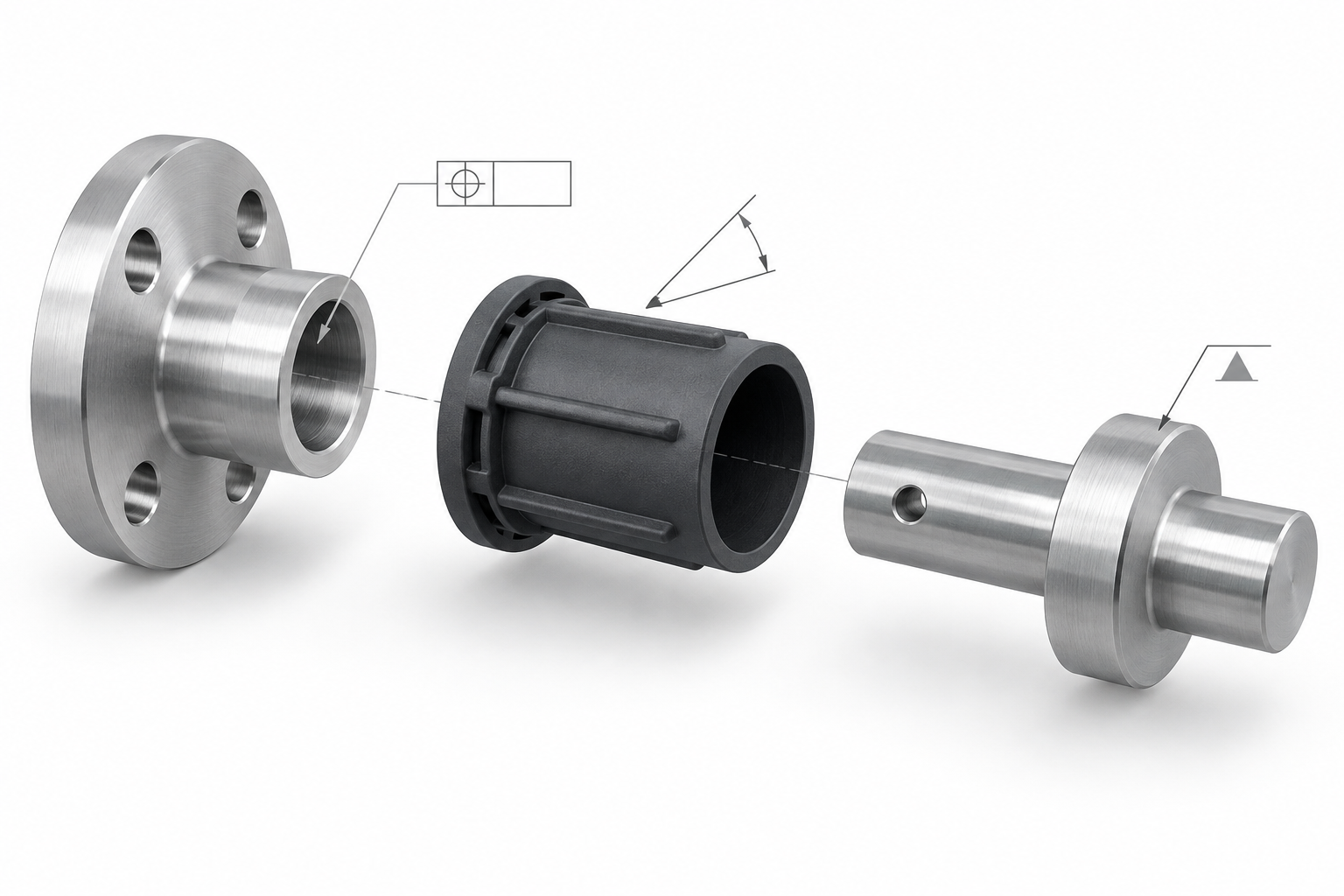
This information doesn't all need to be crammed onto the exploded view, but you must ensure that readers can follow the exploded view to find the corresponding datums and tolerance notes. If the exploded view only marks names, and later during DFM review you have to ask again about fit relationships and datums, then the value of the drawing is discounted. When you need to verify against a specific process, you can refer to the explanations on the CNC machining capabilities or injection molding capabilities pages, align the assumptions on the exploded view with actual process conditions, and then decide which dimensions to tighten and which can be relaxed.
FAQ: How to draw and use a product structure exploded view
The following questions are the ones most often asked when drawing a product structure exploded view. The answers follow the types, annotation, hand drawing, and DFM logic from earlier in this article. For specific values, please refer to the drawing and actual process confirmation.
What software is used to draw a product structure exploded view?
It depends on the purpose. For rendered exploded views shown to clients or judges, structural designers commonly use CAD tools like SolidWorks, Creo, or NX to create disassembly views, then import into KeyShot, C4D, or Blender for materials and lighting; for quick structural communication, pulling an exploded view directly in CAD with annotations is enough. Hand-drawn exploded views use pen and paper or a tablet, with the focus on practicing structural understanding rather than rendering precision. The criterion for choosing software is: who is this drawing for, and does it need to explain assembly sequence or deliver visual impact?
For hand-drawn and software-drawn exploded views, which should I learn first?
It's recommended to start with hand drawing. Hand drawing forces you to think clearly about where each part is removed from, which axis it follows, and what blocks what—mistakes are obvious at a glance; software exploded views can be generated with one click, which makes it easy to skip structural thinking. A common industry approach is to spend a few weeks hand-drawing simple products (such as cameras or desk lamps) to practice disassembly logic, then move to CAD for formal drawings. Mastering hand-drawn exploded views usually requires months of continuous practice, and specific progress varies from person to person.
Do exploded views need tolerances?
Exploded views for client presentations or portfolios generally do not mark tolerances; marking them actually interferes with reading. But for versions intended for manufacturing, key fits should be marked with or imply tolerance zones, such as shaft-hole fits, snap clearances, and screw boss position tolerances. The approach is to attach a key dimension table next to the exploded view, or specify fit grades in leader annotations. Specific tolerance values should be confirmed according to process and function; injection-molded and CNC parts have different concerns and cannot be copied directly.
There are too many parts—how do I simplify the exploded view?
Three common methods: first, grouped explosion, merging standard parts like screws and washers into one subassembly and drawing only a representative part; second, layered explosion, first breaking the whole into several modules, then producing separate local exploded views for key modules; third, switching to a flat exploded view, spreading all parts on one plane and matching them to the BOM by arrangement and numbering. The criterion is: can viewers find the part they want to see within ten seconds? If not, it should be split into multiple drawings.
How do you photograph a physical exploded view?
First fully disassemble the product, arrange the parts on a workbench in assembly order, and use a uniform background (white paper or gray cloth) to reduce distractions. When shooting, take an overhead shot from a slightly higher-than-front angle so that each part's key feature face is visible; products with many parts can be shot in layers and then composited. Schools in Europe and the US often encourage this practice because it can expose assembly sequence problems not noticed on drawings and reduce production error rates. After shooting, remember to check that all parts are present; missing parts will make the entire image lose its reference value.
Key takeaways
- The core value of an exploded view is to verify assembly sequence and expose interference, not just to showcase appearance; before drawing, first confirm the disassembly axis and assembly order.
- The seven types of exploded views each have their applicable scenarios: rendered views for client presentations, white model views for examining structural relationships, section views for checking internal wall thickness and fits, and physical disassembly views for reducing production error rates.
- The annotation method is chosen based on the number of parts and structural complexity: use numbers + names when there are many parts, directly label names when the structure is simple and common, and use names + notes when the structure is simple but uncommon.
- Hand-drawing exploded views is the most effective exercise for understanding structural hierarchy; progressing layer by layer from large forms to details reveals assembly problems better than drawing everything at once.
- The gaps, wall thickness, and draft direction in an exploded view must align with actual manufacturing processes; otherwise, no matter how good the render looks, problems may arise during mold opening or CNC clamping.